

A creator with 1,000 paying members at $20 a month is doing $240,000 a year. The maths is simple. The execution is not.
We have helped hundreds of creators figure out how to create a membership site that actually keeps members past month three. Most guides read like a feature list for whatever platform sponsored the post. This one does not. We are going to walk through the real work, in the order you should do it, with honest opinions about what to use and skip.
You will get eight concrete steps, a short list of recommended platforms, and a frank section on the mistakes we see creators make. By the end you will have a clear plan to start a membership site without wasting six months on the wrong things.
Quick warning. Building a successful membership business is not a weekend project. It rewards patience and iteration far more than launch-week hype. If you want a shortcut, this is not the guide for you.
What you need to decide before you build anything

Most creators skip this part and pay for it later. Before you choose a tool or write a single piece of content, settle four questions on paper. It will take you an afternoon and save you months.
What you are selling
Membership sites usually fall into three buckets. A course-led membership where the value is structured learning. A community-led membership where the value is access to other people and live conversation. Or a hybrid where both matter. The bucket you pick changes the platform you choose, the price you charge, and the way you sell it.
If you cannot describe in one sentence what a member gets, you are not ready to pick a tool yet.
Who you are selling to
Decide between a cohort model and an evergreen model. Cohorts run on a calendar, with everyone starting together. Evergreen lets anyone join at any time. Cohorts tend to drive higher engagement in the first month. Evergreen tends to scale more easily once you have a working funnel.
Pick one. Doing both at launch is a mistake.
Pricing model
You have four obvious options. Monthly subscription. Annual subscription, usually at a 15 to 20 percent discount. A one-time lifetime fee. Or tiered pricing with two or three plans.
For a first membership, we recommend a single monthly plan with an annual option. Tiers come later, once you know what people actually want.
Free or paid trial
Free trials get more sign-ups. Paid trials, usually $1 or $7 for the first seven days, attract members who are more likely to stay past month three. If you are confident in your onboarding, run a free trial. If you are not, charge from day one and let the price do the filtering.
Step 1: Validate the membership idea with 10 paying members first
Pre-sell. Do not build.
The biggest mistake we see when creators try to start a membership site is spending three months building before talking to a single buyer. By the time they launch they are exhausted, the content is aimed at the wrong audience, and they have no list to sell to.
Set a target of 10 paying founding members before you build anything beyond a landing page. This is the 10-customer test. If you cannot find 10 people who will hand you real money for a clear promise, the idea is not validated yet. Better to learn that now.
Three cheap ways to validate:
- A waitlist landing page with an email capture and a one-paragraph promise
- A Google Form that asks five questions and ends with “would you pay $X a month for this”
- A live Stripe payment link, even for $1, to confirm people will go through checkout
When you have your 10, you have permission to build. Not before.
For a deeper read on why retention beats acquisition once you do launch, see our piece on member retention strategies. That work starts long before launch day.
Step 2: Choose a membership site platform
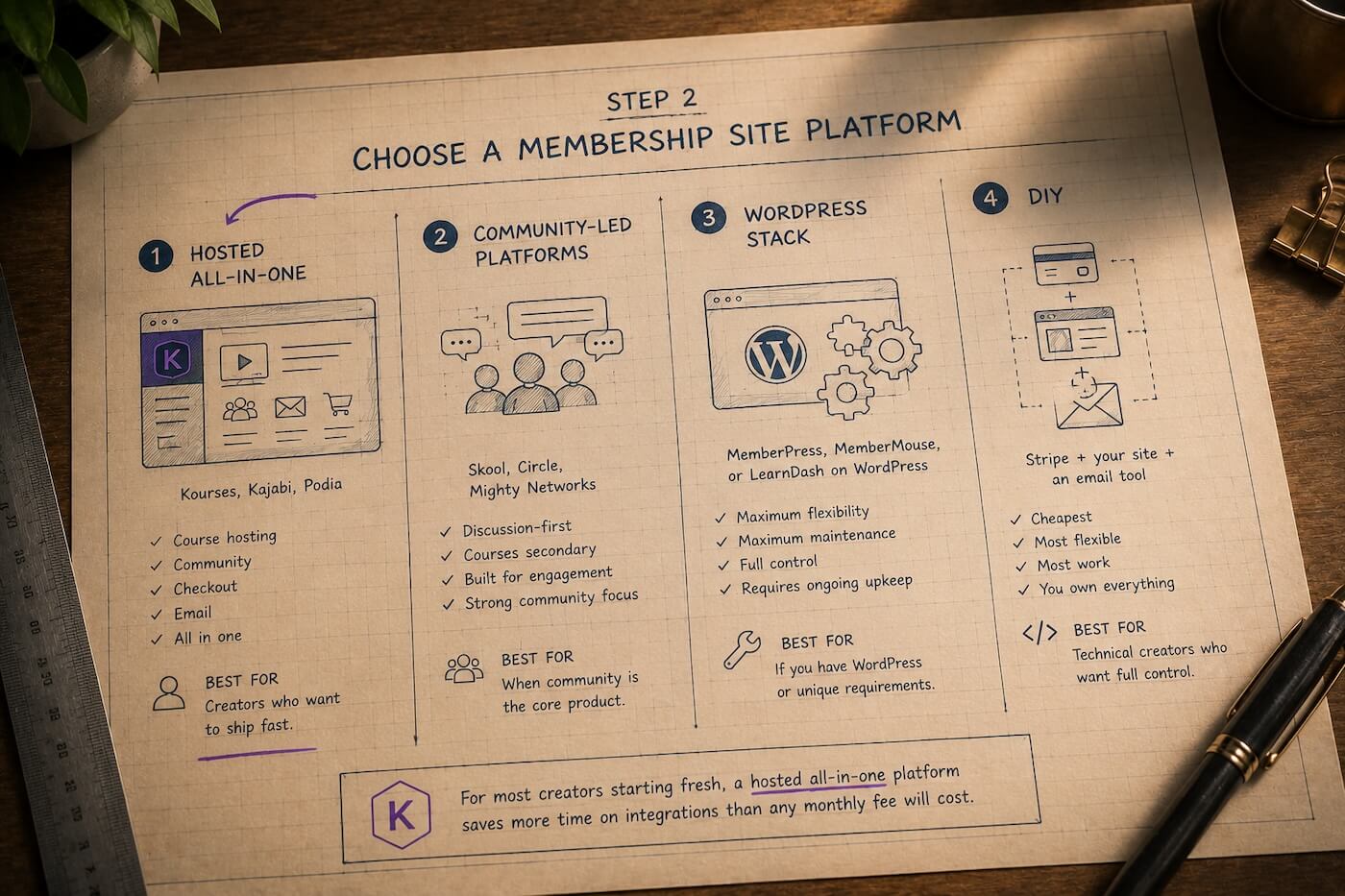

This is where most articles turn into a feature list. We will skip that. Instead, here are the four realistic buckets and what each one is actually good for.
Hosted all-in-one platforms (Kourses, Kajabi, Podia). These bundle course hosting, community, checkout, and email into one product. Best for creators who want to ship fast. Kajabi has the most polish and the highest price. Kourses has 0 percent transaction fees and a strong community layer, but no native mobile app yet. Podia is the lightest of the three.
Community-led platforms (Skool, Circle, Mighty Networks). Best if discussion is the core product and courses are secondary. Skool is the most opinionated. Circle gives you the most design control. Mighty Networks has the strongest native mobile experience.
WordPress stack (MemberPress, MemberMouse, or LearnDash on WordPress). Maximum flexibility, maximum maintenance. Best if you already have a WordPress site or specific requirements no SaaS tool meets. Plan for plugin updates and the occasional broken integration.
DIY (Stripe plus your own site plus an email tool). Cheapest, most flexible, most work. Best for technical creators who want to own every piece of the stack.
We are biased, but for most creators starting fresh we would point at a hosted all-in-one. The time you save on integrations is worth more than any monthly fee. For a longer comparison, our roundup of the best membership platforms goes deeper.
Step 3: Set up the technical foundations
Setup is faster than you think. Block out one focused day and finish it in that day. Perfectionism here is procrastination in disguise.
If you are using a hosted all-in-one platform like Kourses, most of the items below are handled for you — hosting, Stripe connection, and email are all built in. The list below is the full picture for any setup, so skip what your platform already covers.
You need:
- A domain name. Buy a clean .com if you can. Connect it to your platform via DNS records.
- Hosting, if you are running WordPress or a custom stack. Skip this if you chose a hosted platform.
- A Stripe connection. Almost every modern platform uses Stripe under the hood. Stripe’s billing documentation walks through subscriptions clearly if you want to understand what is happening behind the checkout button.
- An email tool. Use the platform’s built-in email if it has one. If it does not, connect ConvertKit, MailerLite, or your existing provider.
- Legal pages. Terms of service, a privacy policy, and a refund policy. Use a template, get a lawyer to review if you can afford it, and then move on.
If your platform supports it, this is also where you turn on 0 percent transaction fees and any tax handling features. Tax handling alone is worth setting up early, before you have to fix it retroactively.
Step 4: Build the member onboarding flow
Onboarding is the most under-built part of most membership sites and the highest-leverage thing you can fix. A member who does not hit their first win in week one is a member you will probably lose by month three.
Design a welcome sequence of three to five emails over the first seven days. Each email should drive one specific action. Sign in. Introduce yourself. Watch the first lesson. Post a question.
Define the aha moment for your specific membership. The aha moment is the smallest win that proves the membership is worth paying for. For a fitness membership it might be completing the first workout. For a writing membership it might be posting a first draft and getting feedback. Write it down, then engineer your onboarding to drive every new member to it within seven days.
Members who hit the aha moment in week one retain at roughly two to three times the rate of members who do not.
Step 5: Create the core content (start small)
If you are launching with 50 hours of video, you have built too much. Real talk.
Your launch content stack should be small enough to ship and good enough to keep members busy for the first month. Roughly:
- One cornerstone resource. This is the signature piece a member can complete in their first two weeks. It should solve a clearly defined problem.
- A short library of supporting lessons or templates. Five to ten pieces is enough.
- A live element. A weekly call, a monthly Q and A, an office hours session. Live time is what makes a membership feel alive.
From launch onward, add weekly. Recurring content keeps the membership fresh and gives members a reason to log in. Tools that let you stagger releases, like the drip content features built into most modern platforms, are excellent for pacing material across the first 30 days so members never feel overwhelmed or under-served.
Resist the urge to build a Netflix-sized catalogue before launch. Members do not want a library. They want progress.
Step 6: Launch the membership (the first 30 days)
Launch week is the most important week of your first year. Treat it that way.
Two to four weeks before launch, build a pre-launch list with a waitlist page and a couple of free resources. Aim for at least 500 emails before you open the doors. Smaller lists can work, but the maths gets harder.
Open with founding member pricing. A 30 to 40 percent discount on the first year, with a real deadline of seven to ten days, gives early members a reason to act. State the deadline clearly. Mean it.
During launch week, send daily emails. Yes, daily. Most launches fail because creators are too polite to email enough. Mix testimonials, behind-the-scenes posts, waitlist FAQs, and a final-day closing email. Confident, not pushy.
The first 30 paying members are genuinely the hardest. After that, social proof and word of mouth start carrying part of the load.
Step 7: Build the community engine
Content gets members in. Community keeps them in.
This is the part most creators undervalue. Across hundreds of creators we have worked with at our community platform, the biggest predictor of long-term retention is whether members are talking to each other by the end of month one. Not consuming your content. Talking to each other.
Set the discussion expectation in the first week. Post a daily welcome thread for the first 14 days. Tag new members by name. Ask easy, specific questions. Reply within a few hours.
After the first month, build moderator routines. A weekly check-in thread. A monthly wins thread. A clear posting structure. If your membership grows past 200 active members, recruit one or two community champions and give them visibility.
If you are running paid communities at any scale, community engineering is its own discipline. Do not treat it as something the platform does for you.
Step 8: Measure and iterate
You cannot improve what you do not measure. Track three numbers from month one, not month six.
Monthly retention rate. Of the members who started the month, how many were still members at the end. Healthy memberships sit at 90 percent or higher. Below 80 percent and you have a retention problem you need to solve before you scale acquisition.
Average member value. Total revenue divided by total members. Useful for spotting whether your annual plan and upsells are working.
Time to first engagement. Days between sign-up and a member’s first meaningful action. Aim for under 48 hours. Above seven days and your onboarding is broken.
Run a content audit every quarter. Look at what members are actually using. Cut what they are not. Most memberships improve faster by removing weak content than by adding more.
Public SaaS and subscription churn benchmarks from sources like Recurly and Stripe can be useful sanity checks, but creator memberships often retain better than the SaaS average because the relationship is more personal. Use the numbers as guideposts, not gospel.
Common mistakes when creating a membership site

A short list of what we see creators get wrong, in rough order of how much damage each one does.
- Over-building content before launching. Three months of recording before a single member joins. Almost always wasted effort. Validate first, build second.
- Underpricing the membership. Lower prices attract people who churn faster. A $10 a month membership has to retain twice as well as a $20 one to make the same money. Charge more than feels comfortable.
- Treating retention as set-and-forget. Retention is a weekly habit. Welcome new members. Spot the quiet ones. Re-engage them before they cancel. Platforms do not do this for you.
- Picking a community-first platform when you need a course-first one. Or the other way round. The platform should match the centre of gravity of your membership. If 80 percent of your value is structured lessons, do not build on a discussion-first tool.
- No clear cancellation reason capture. When someone cancels, ask why in one click. The answers will tell you exactly what to fix next.
Frequently asked questions
How much does it cost to create a membership site?
For a hosted platform, expect to pay between $9 and $200 a month for software, plus standard payment processing fees. Kourses starts at $9 a month with 0% transaction fees. Add a domain name at around $15 a year, an email tool if not bundled, and any paid templates or design help. A lean creator can launch for well under $50 a month in total on a modern all-in-one platform. A WordPress stack can be cheaper on paper but adds hosting and maintenance time.
How long does it take to build a membership site?
Setting up the technical foundations of a membership site takes between one and seven days on a modern platform. Validating the idea and getting to your first 10 paying members realistically takes four to eight weeks if you are starting with no audience. Plan for six to twelve weeks from idea to a functioning membership with paying members in it.
What is the best platform for a membership site?
There is no single best platform. For most creators starting fresh we would recommend a hosted all-in-one like Kourses, Kajabi, or Podia. If community is the entire product, look at Skool or Circle. If you need maximum control and already have technical help, WordPress with MemberPress is a credible option. The right platform is the one that matches what you are actually selling.
Can I create a membership site without coding?
Yes. Every platform mentioned above lets you create a membership website without writing code. You will configure settings, upload content, and connect Stripe, but no programming is required. Even the WordPress route is mostly point and click once the plugins are installed.
How do I price my membership site?
Start with the value you are delivering and the type of buyer you want. For most creator memberships, prices land between $15 and $79 a month, with annual plans at a 15 to 20 percent discount. Higher-touch memberships with live coaching often charge $99 to $300 a month. The lowest price you can sell at is almost never the right price. Test higher than feels comfortable, then adjust based on conversion and retention data.
The bottom line
Remember this. Validate before you build. Pick the platform that matches what you are selling. Ship a small first version. Onboard members to a real aha moment in week one. Build community early. Measure retention from day one and improve weekly.
That is how to build a membership site that lasts beyond launch buzz.
If you want to give Kourses a try, our online course platform includes community, courses, checkout, and email in one place, with 0 percent transaction fees. We do not yet have a native mobile app, so if a branded iOS or Android app is non-negotiable for your audience, we will not be the right fit yet. For most creators it is not, and our web experience is built to feel as good on a phone as on a laptop. You can see plans on the Kourses pricing page and start a free trial whenever you are ready.
Build the thing. Talk to your members. Improve it every week. That is the whole job.

